
iPhone Thermometer: Can Your iPhone Take Your Temperature?

The short answer: an iPhone cannot measure your body temperature on its own, but since the iPhone 15 it has a USB-C port, so a thermometer can plug straight into it. TempBuddy is one: plug it into any iPhone from the iPhone 15 to the new iPhone 18 Pro, open the free Zanis TempBuddy app and hold it near the forehead. The reading appears on the iPhone screen in about half a second, with no batteries and no Bluetooth pairing.
Can an iPhone take your temperature?
No. An iPhone has temperature sensors, but they protect the battery and the processor; they do not point at you. Apps that claim to read a fever through the screen, the camera or the flash cannot give a body temperature you can rely on.
The Apple Watch is often mentioned here too. Apple Watch Series 8 and later, and the Apple Watch Ultra models, track changes in wrist temperature while you sleep and show them in the Health app. Apple says this is not a thermometer: it shows how your nightly wrist temperature moves against your own baseline, and it cannot take a reading on demand.1 When you want to know whether a child has a fever right now, you need a real thermometer.
So an "iPhone thermometer" means one of two things: a thermometer that plugs into the iPhone, or one that sends readings to an iPhone app over Bluetooth.
Which iPhones work with a plug-in thermometer?
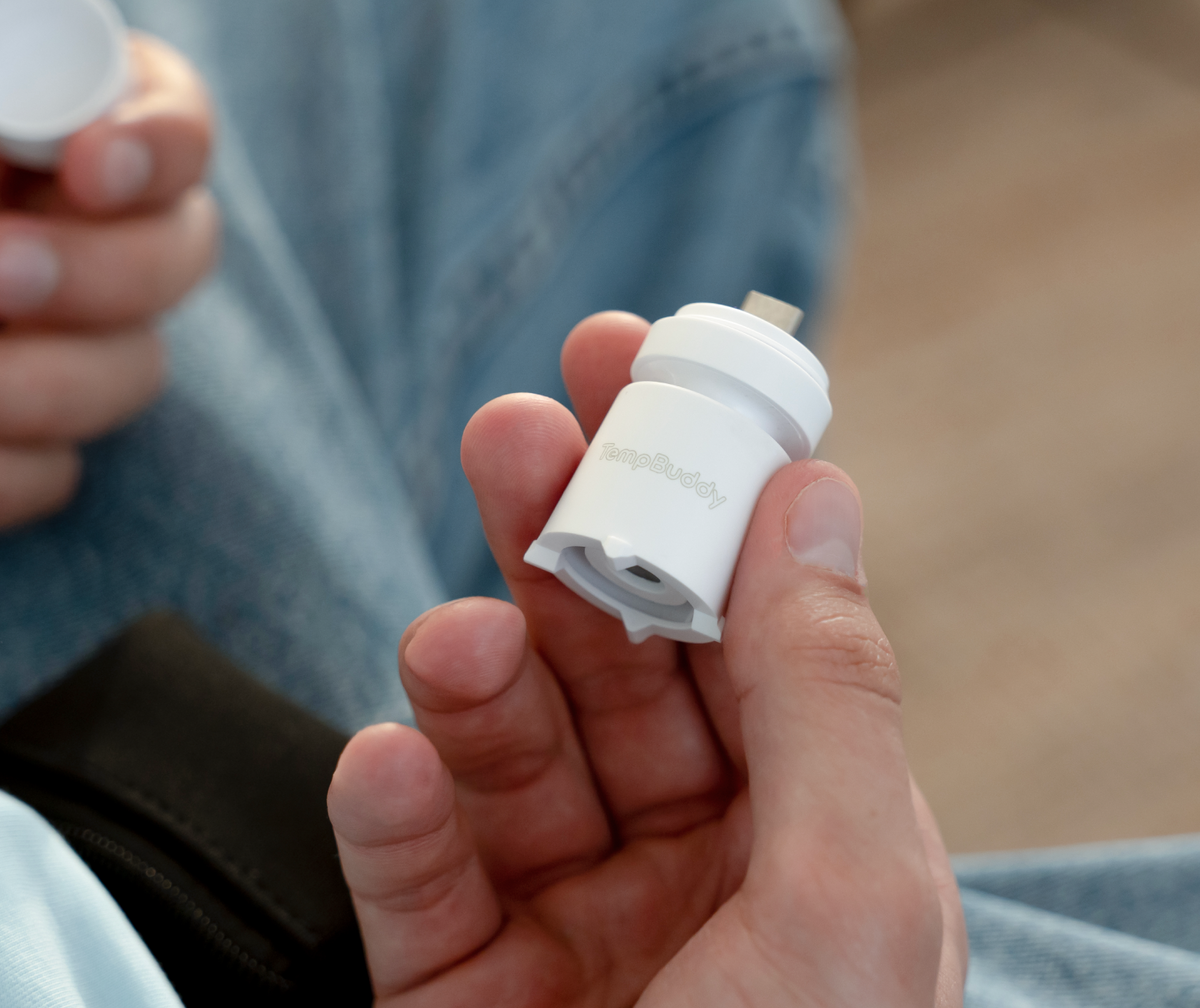
Every iPhone since the iPhone 15 (2023) has a USB-C port.2 TempBuddy uses USB-C, so it fits every iPhone from the 15 onward.
| iPhone | Port | Works with TempBuddy? |
|---|---|---|
| iPhone 18 Pro, 18 Pro Max | USB-C | Yes |
| iPhone 17, 17 Pro, 17 Pro Max, iPhone Air, iPhone 17e | USB-C | Yes |
| iPhone 16, 16 Plus, 16 Pro, 16 Pro Max, iPhone 16e | USB-C | Yes |
| iPhone 15, 15 Plus, 15 Pro, 15 Pro Max | USB-C | Yes |
The app needs iOS 17 or later. Every USB-C iPhone shipped with iOS 17 or newer, so if your iPhone has a USB-C port, it is ready.
How to check which port your iPhone has
- Open Settings › General › About and look at Model Name. iPhone 15 or a higher number means USB-C.
- Or look at the charging port. A USB-C port is an oval with rounded ends.
- Or check your charging cable. If it has the same oval plug on both ends, your iPhone is USB-C.
How to set up TempBuddy on an iPhone
- Install the free Zanis TempBuddy app from the App Store.
- Open the app and add a profile for each person you will measure.
- Plug TempBuddy into the iPhone's USB-C port. There is nothing to charge and nothing to pair.
- Choose the person, then hold the sensor 1 to 5 cm (0.4 to 2 in) from the centre of the forehead for about half a second.
- Read the temperature on the screen. It is colour coded green, amber or red and saved to that person's history with the date and time.
For the most reliable reading, keep the thermometer and the person in the same room for about 20 minutes first, and avoid measuring straight after a bath, exercise or coming in from the cold. Forehead readings usually run a little lower than core temperature, so tell your doctor it was a forehead reading.
Plug-in or Bluetooth: which iPhone thermometer?
| Plug-in USB-C thermometer (TempBuddy) | Bluetooth thermometer with iPhone app | |
|---|---|---|
| iPhones it works with | iPhone 15 and newer | Depends on the model |
| Batteries | None, powered by the iPhone | Required |
| Pairing | None, plug in and read | Pair once, and again if the connection drops |
| Where you see the reading | The iPhone screen | The thermometer's small screen and the app |
| Works without the phone | No | Usually |
If your iPhone is a 15 or newer and is usually within reach, a plug-in thermometer removes the two things people complain about most: flat batteries and lost Bluetooth connections. If you want a thermometer that works on its own, choose a Bluetooth or standard model.
What the TempBuddy app does on iPhone
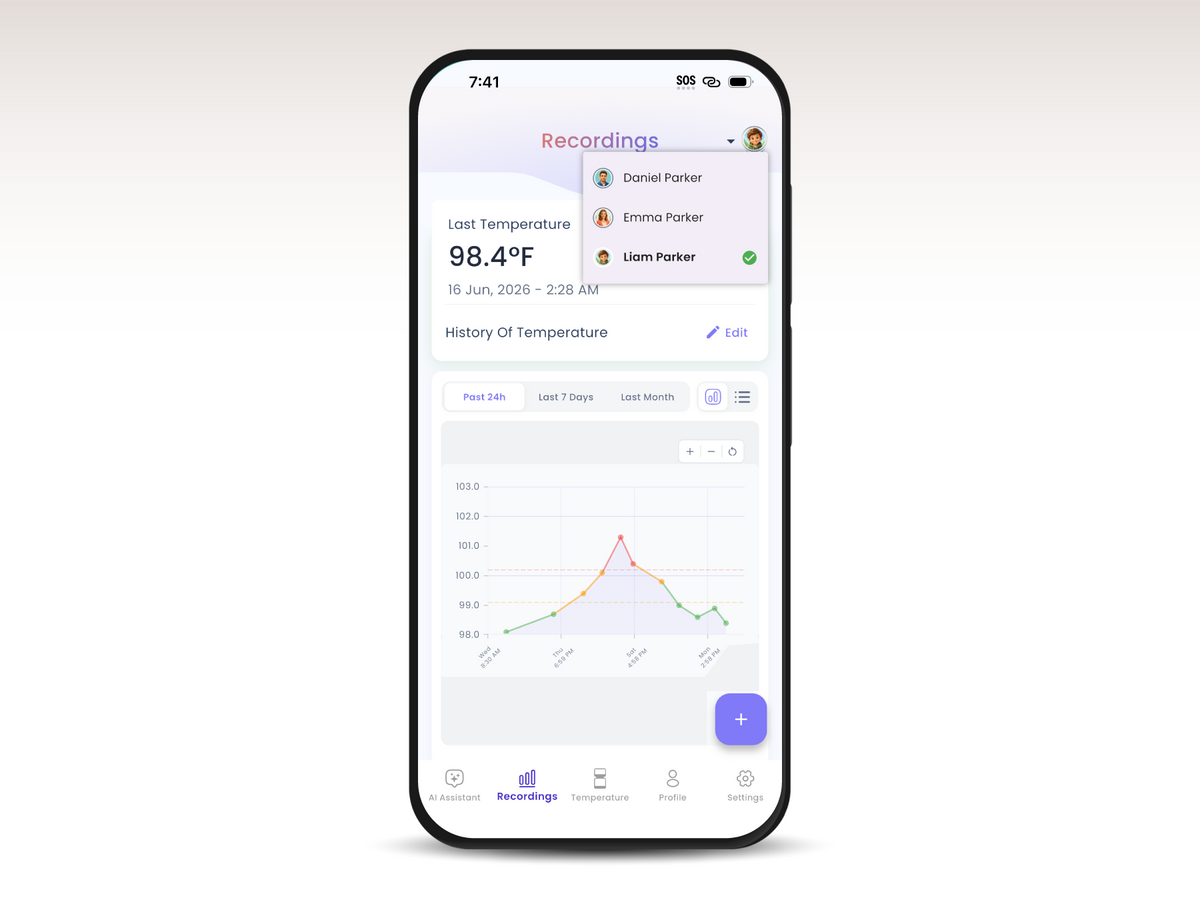
- Family profiles. Each reading is saved to the right person.
- Fever history. A graph of the last 24 hours, 7 days or 30 days shows whether a fever is rising or settling.
- Symptoms and medication. Note what you gave and when, next to the temperatures.
- A PDF report for the doctor. Share the history at an appointment.
- Silent Mode. Turns off the scan tone so you can check a sleeping child.
- Object mode. Checks a baby bottle, bath water or food from 0 to 100 °C (32 to 212 °F).
The same app runs on Android, so a family with both iPhones and Android phones can use one TempBuddy. For the details of how plug-in thermometers work, read our phone thermometer guide.
Who an iPhone thermometer is for, and who it is not for
A good fit for: parents with an iPhone 15 or newer who check children at night, families who want one fever history for everyone, and anyone caring for an older parent who finds a big phone screen easier to read than a small thermometer display.
Not the right choice for:
- Babies under 3 months. The American Academy of Pediatrics says a rectal reading is the most reliable at this age.3 Use TempBuddy from 3 months, or as a second thermometer for quick checks.
- Anyone who wants a thermometer without a phone. TempBuddy needs the phone and the app.
A thermometer helps you notice and record a fever. It does not diagnose anything. If you are worried about someone's temperature or symptoms, contact a health professional.
Frequently asked questions
Can my iPhone take my temperature?
No. The sensors inside an iPhone measure the battery and the processor, not your body, and apps that claim to read a fever through the screen or camera are not reliable. To check for a fever with an iPhone you need a thermometer that works with it, such as TempBuddy, which plugs into the USB-C port of iPhone 15 and newer.
Can an Apple Watch check for a fever?
Not on demand. Apple Watch Series 8 and later track changes in wrist temperature overnight against your own baseline. Apple says this feature is not a thermometer, so use a thermometer when you want to know someone's temperature now.
Which iPhones work with TempBuddy?
Every iPhone with a USB-C port: iPhone 15, 16 and 17 models, including iPhone 16e, iPhone Air and iPhone 17e, and the new iPhone 18 Pro and 18 Pro Max. The app needs iOS 17 or later, which all of these iPhones have.
Does an iPhone thermometer need Bluetooth or batteries?
TempBuddy needs neither. It plugs into the iPhone's USB-C port, takes a tiny amount of power from the phone and sends the reading through the connector, so there is nothing to charge or pair.
Is the TempBuddy app free on the App Store?
Yes. The Zanis TempBuddy app is free on the App Store and on Google Play. If the App Store asks for payment details, that is part of Apple's account setup, not a charge for the app.
How accurate is TempBuddy on an iPhone?
The phone does not change the accuracy: up to ±0.1 °C (±0.18 °F) in body mode in stable room conditions, as set out in the user manual, and ±0.2 °C (±0.36 °F) in other conditions. Forehead readings usually run a little lower than core temperature.
Can one TempBuddy be used with an iPhone and an Android phone?
Yes. The same free app runs on iPhone 15 and newer and on Android phones with USB-C (Android 7.0 or later), so one thermometer can be plugged into either.
Where to buy TempBuddy
TempBuddy is sold on zanis.io and on Amazon. It comes with a carry pouch, a 30-day refund and a one-year warranty.
Keep reading
- Phone thermometer: how a thermometer that plugs into your phone works
- How to take a child's temperature while they sleep
- Smart thermometer app: how to keep a family fever log
- TempBuddy support, setup video and user manual
Sources
- Apple Support: Track your nightly wrist temperature changes with Apple Watch.
- Apple Support: Charge and connect with the USB-C connector on your iPhone.
- American Academy of Pediatrics, HealthyChildren.org: How to Take a Child's Temperature.
- TempBuddy ZTP-800 Full User Manual, on our support page.
This article is general information, not medical advice. If you are worried about someone's temperature or symptoms, contact a health professional. See our medical disclaimer.